

AWS
Follow this guide to provision Supermetal BYOC (Bring Your Own Cloud), which deploys Supermetal's data replication agents in your own virtual cloud environment, maintaining full control and ownership over your data. This provides an additional layer of security and isolation. Supermetal handles provisioning, operations, and maintenance.
Overview
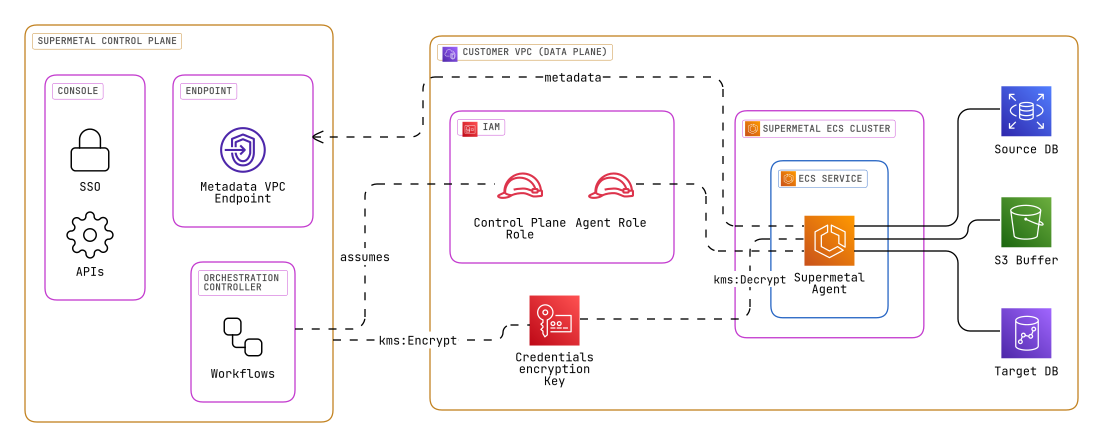
- Data Sovereignty: Your primary data (being replicated) is processed entirely within your AWS VPC and never leaves your environment to the Supermetal Control Plane.
- Secure Communication: All metadata communication between Supermetal agents in your VPC and the Supermetal Control Plane occurs securely over AWS PrivateLink via an Interface VPC Endpoint. This traffic is encrypted in transit using TLS 1.2+.
- Credential Protection: Sensitive connector credentials provided to Supermetal are encrypted using your AWS KMS Customer Managed Key (
CredentialsKeyArn) before being stored by the Supermetal Control Plane. Only the Supermetal Agents decrypt these credentials at runtime within your environment. Supermetal Control Plane cannot decrypt these credentials. - IAM Security: The cross-account role (
SupermetalControlPlaneRole) assumed by Supermetal utilizes anExternalIdto protect against the "confused deputy" problem. All IAM roles are designed with the principle of least privilege to perform only their required functions.
Prerequisites
To successfully deploy Supermetal BYOC in your AWS environment, please ensure you have the following:
Supermetal Account Identifier
Supermetal account identifier (obtainable from the Supermetal Console under Settings).
SUPERMETAL_ACCOUNT_ID
AWS Account & Permissions
- IAM User or Role with sufficient permissions (e.g.,
AWSAdministratorAccess) to bootstrap the Supermetal BYOC environment using either the CloudFormation or the Terraform.
Deployment Parameters
- AWS Account ID: The AWS Account ID of the target deployment account (e.g.,
123456789012). - AWS Region(s): The AWS Region(s) of the target deployment account (e.g.,
us-east-1,eu-west-2). - VPC ID (
VpcId): The ID of an existing VPC within your chosen AWS Region where the bootstrap infrastructure and Supermetal agents will be deployed to on connector creation. - Subnet IDs (
SubnetIds): A list of (private) subnet IDs within your specifiedVpcId. Supermetal agents will be deployed across these subnets for high availability. Ensure these subnets belong to the same availability zones as your source (and target) databases. - (Optional) KMS Key for Credentials (
CredentialsKeyArn): Decide if you'll use an existing AWS KMS Customer Managed Key (CMK) for encrypting sensitive connector credentials. If you have an existing CMK, have its ARN ready. If left blank, the bootstrap process will create a new KMS key specifically for Supermetal.
Setup
A two phase process, one is to bootstrap the environment and the other is to create a connector to deploy the data plane / agents in your VPC.
Environment Bootstrap
The bootstrap process uses an AWS CloudFormation template or a Terraform script provided by Supermetal to provision the necessary resources, including IAM roles and private endpoint. These IAM roles are used by Supermetal to automatically register your cloud environment with the Supermetal control plane over the private endpoint, and to automatically deploy Supermetal data plane / agents in your VPC.
Environment Bootstrap
The initial environment bootstrap process does not provision any compute resources or the data plane / agents. Once the environment bootstrap is complete, you can create connectors to deploy Supermetal data plane / agents on-demand in your VPC.
You can use the AWS Management Console or the AWS CLI to deploy the bootstrap CloudFormation template.
Obtain CloudFormation Template
- Obtain the latest CloudFormation template file from the Supermetal Console, the template from appendix is for reference.
Deploy CloudFormation Template
Deploy with AWS Management Console
Prepare and Initiate Stack Creation
- Navigate to the AWS CloudFormation console in your AWS account.
- Ensure you are in the correct AWS Region for your deployment.
- Click "Create stack" and select "With new resources (standard)".
- Under "Prerequisite - Prepare template", choose "Template is ready".
- Under "Specify template", select "Upload a template file".
- Click "Choose file" and upload the CloudFormation template file you obtained.
- Click "Next".
Specify Stack Details
- On the "Specify stack details" page, enter a "Stack name" (e.g.,
supermetal-bootstrap). - In the "Parameters" section, provide values for each parameter.
- Click "Next".
Parameters
Refer to the Deployment Parameters section above for detailed explanations of each.
SupermetalAccountIdVpcIdSubnetIdsCredentialsKeyArn
Review and Create
- On the "Review" page, carefully review all your settings and parameter values.
- Scroll to the bottom and find the "Capabilities" section.
- Important: You must check the box that says: "I acknowledge that AWS CloudFormation might create IAM resources with custom names." (The exact wording might vary slightly).
- Click "Create stack" (or "Submit" depending on the AWS console version).
Deploy with AWS CLI
- AWS variables necessary to authenticate. Use either:
AWS_PROFILEAWS_ACCESS_KEY_IDandAWS_SECRET_ACCESS_KEY
- Verify access, run
aws sts get-caller-identity --region <region>. See the AWS CLI reference.
Deploy Stack
Use the aws cloudformation deploy command to create the stack.
aws cloudformation deploy \
    --template-file /path/to/your/supermetal-bootstrap-cf-template.yaml \
    --stack-name supermetal-bootstrap \
    --capabilities CAPABILITY_IAM CAPABILITY_NAMED_IAM \
    --parameter-overrides \
    SupermetalAccountId="$SUPERMETAL_ACCOUNT_ID" \
    VpcId="$VPC_ID" \
    SubnetIds="$SUBNET_IDS" \
    CredentialsKeyArn="$CREDENTIALS_KEY_ARN" # Optional: Provide a Customer Managed Key (CMK) ARN for encrypting connector credentials
Parameters
Refer to the Deployment Parameters section above for detailed explanations of each.
SUPERMETAL_ACCOUNT_IDVPC_IDSUBNET_IDSCREDENTIALS_KEY_ARN
Verification
- Monitor the CloudFormation stack creation process in the AWS CloudFormation console. It may take several minutes to complete.
- Once the CloudFormation stack status shows
CREATE_COMPLETE, Supermetal's Control Plane automatically performs a registration process for the new environment post stack creation. - Monitor the Environments page in your Supermetal Console. The environment should show up with a "Ready" status within a few minutes after the CloudFormation stack completes.
You can use the Terraform CLI to deploy the bootstrap module.
Obtain Terraform Script
- Obtain the latest Terraform script from the Supermetal Console. The Terraform code in the appendix can be used as a reference or saved as local files (e.g.,
main.tf,variables.tf,outputs.tf).
Configure Terraform
- Ensure you have Terraform installed (version 1.0 or later).
- Set up your AWS credentials for Terraform. This typically involves configuring the AWS CLI and ensuring your environment variables (
AWS_ACCESS_KEY_ID,AWS_SECRET_ACCESS_KEY,AWS_SESSION_TOKEN) or AWS profile (AWS_PROFILE) are correctly set. - Verify access by running
aws sts get-caller-identity --region <your-aws-region>. Refer to the AWS provider documentation for more details.
Prepare Terraform Files
- Create a new directory for your Terraform configuration.
- If using the appendix script, save the Terraform code into files within this directory (e.g.,
main.tf). - Create a
terraform.tfvarsfile in the same directory to specify the required variable values. Alternatively, you can pass variables via the command line.
Example terraform.tfvars:
vpc_id                                = "vpc-xxxxxxxxxxxxxxxxx"
private_subnet_ids                    = ["subnet-xxxxxxxxxxxxxxxxx", "subnet-yyyyyyyyyyyyyyyyy"]
external_id                           = "your-supermetal-provided-external-id"
supermetal_control_plane_aws_account_id = "supermetal-aws-account-id" # Provided by Supermetal
supermetal_metadata_service_endpoint_name = "com.amazonaws.vpce.your-region.vpce-svc-xxxxxxxxxxxxxxxxx" # Provided by Supermetal
# credentials_key_arn                 = "arn:aws:kms:your-region:your-account-id:key/your-key-id" # Optional: Only if using an existing KMS CMK
Parameters
Refer to the Deployment Parameters section and the variable descriptions within the Terraform script for detailed explanations of each.
vpc_idprivate_subnet_idsexternal_idsupermetal_control_plane_aws_account_idsupermetal_metadata_service_endpoint_namecredentials_key_arn(Optional)
Deploy with Terraform CLI
- Navigate to your Terraform configuration directory in your terminal.
- Initialize Terraform:
terraform init - Review the execution plan:
terraform plan - Apply the configuration:
terraform applyyeswhen prompted.
Variable Input
If you didn't use a .tfvars file, you can pass variables directly with the apply command. Ensure you provide values for all required variables:
terraform apply \
    -var="vpc_id=vpc-xxxxxxxxxxxxxxxxx" \
    -var="private_subnet_ids=[\"subnet-xxxxxxxxxxxxxxxxx\", \"subnet-yyyyyyyyyyyyyyyyy\"]" \
    -var="external_id=YOUR_EXTERNAL_ID_FROM_SUPERMETAL_CONSOLE" \
    -var="supermetal_control_plane_aws_account_id=SUPERMETAL_CONTROL_PLANE_AWS_ACCOUNT_ID" \
    -var="supermetal_metadata_service_endpoint_name=COM_AMAZONAWS_VPCE_YOUR_REGION_VPCE_SVC_XXXXXXXXXXXXXX" \
    # Optional: Provide this if you are using an existing KMS CMK.
    # If omitted and 'credentials_key_arn' is not set in a .tfvars file, a new KMS key will be created.
    # -var="credentials_key_arn=arn:aws:kms:your-region:your-account-id:key/your-key-id"
Replace placeholder values (e.g., vpc-xxxxxxxxxxxxxxxxx, YOUR_EXTERNAL_ID_FROM_SUPERMETAL_CONSOLE) with your actual values.
Verification
- Monitor the
terraform applycommand output. It will indicate when the resources have been successfully created. - Once the Terraform apply is complete, Supermetal's Control Plane automatically performs a registration process for the new environment.
- Monitor the Environments page in your Supermetal Console. The environment should show up with a "Ready" status within a few minutes after Terraform completes.
Create Connector(s) to deploy Supermetal agents
Once the environment bootstrap is complete, we are now ready to create a connector to deploy Supermetal agents in your VPC.
Select source database
Follow the connector setup instructions in the Supermetal Console to select a source database, supermetal can optionally auto discover available source databases.
Create Security Group and Configure Source Database Access
To give Supermetal access to your source database and to validate network reachability and connection credentials, you need to create a security group and configure the source database access.
Create Security Group
Supermetal Console will list pre-filled steps to create the security group and configure the database access as part of the prerequisite steps similar to the steps listed below.
# Create the security group
SG_ID=$(aws ec2 create-security-group \
  --description "Security group for Supermetal" \
  --vpc-id $VPC_ID \
  --output text --query 'GroupId')

# Add required outbound rules
# 1. For metadata VPC endpoint (created during environment bootstrap)
aws ec2 authorize-security-group-egress \
  --group-id $SG_ID \
  --protocol tcp \
  --port 443 \
  --source-group $(aws ec2 describe-security-groups \
    --filters Name=group-name,Values=supermetal-metadata-sg Name=vpc-id,Values=$VPC_ID \
    --query 'SecurityGroups[0].GroupId' --output text)

# 2. For database access
aws ec2 authorize-security-group-egress \
  --group-id $SG_ID \
  --protocol tcp \
  --port $DATABASE_PORT \
  --source-group $DATABASE_SECURITY_GROUP_ID

# Add database access rule to your database's security group
aws ec2 authorize-security-group-ingress \
  --group-id $DATABASE_SECURITY_GROUP_ID \
  --protocol tcp \
  --port $DATABASE_PORT \
  --source-group $SG_ID
Parameters
VPC_ID: The VPC ID of your environment. Refer to the Deployment Parameters sectionDATABASE_SECURITY_GROUP_ID: The security group ID of your databaseDATABASE_PORT: The port number your database listens on (e.g., 5432 for PostgreSQL)- The metadata endpoint security group (
supermetal-metadata-sg) is automatically looked up using the VPC ID
Create Security Group and Configure Database Access
- Navigate to the AWS EC2 Console > Security Groups
- Click Create security group
- Configure the basic details:
- Description: "Security group for Supermetal agents "
- VPC: Select the same VPC used for your Supermetal environment
- Leave Inbound rules empty (no rules needed)
- Outbound rules (required):
- Add rule for metadata access:
- Type: HTTPS
- Port: 443
- Destination: Security group named
supermetal-metadata-sg(created during environment bootstrap)
- Add rule for database access:
- Type: Custom TCP
- Port: Your database port
- Destination: Your database's security group
- Add rule for metadata access:
- Click Create security group and note the Security Group ID
Configure Database Access
- Locate your database's security group
- Edit its inbound rules:
- Type: Custom TCP
- Port: Your database port (e.g., 5432 for PostgreSQL)
- Source: Select the
supermetal-agent-sgsecurity group
- Save the rules
CloudFormation Template for Security Groups
Resources:
  # Create the Supermetal Agent Security Group
  SupermetalAgentSecurityGroup:
    Type: AWS::EC2::SecurityGroup
    Properties:
      GroupDescription: Security group for Supermetal agents
      VpcId: !Ref VpcId
      SecurityGroupEgress:
        # Required outbound rules
        - Description: Allow access to metadata service
          IpProtocol: tcp
          FromPort: 443
          ToPort: 443
          SourceSecurityGroupId: !Ref MetadataSecurityGroup
        - Description: Allow access to database
          IpProtocol: tcp
          FromPort: !Ref DatabasePort
          ToPort: !Ref DatabasePort
          SourceSecurityGroupId: !Ref DatabaseSecurityGroupId

  # Look up the existing metadata security group
  MetadataSecurityGroup:
    Type: AWS::EC2::SecurityGroup::Id
    Properties:
      Filters:
        - Name: group-name
          Values: [supermetal-metadata-sg]
        - Name: vpc-id
          Values: [!Ref VpcId]

  # Add the ingress rule to the database security group
  DatabaseSecurityGroupIngress:
    Type: AWS::EC2::SecurityGroupIngress
    Properties:
      GroupId: !Ref DatabaseSecurityGroupId
      IpProtocol: tcp
      FromPort: !Ref DatabasePort
      ToPort: !Ref DatabasePort
      SourceSecurityGroupId: !Ref SupermetalAgentSecurityGroup

Parameters:
  VpcId:
    Type: AWS::EC2::VPC::Id
    Description: VPC where the security groups will be created

  DatabaseSecurityGroupId:
    Type: AWS::EC2::SecurityGroup::Id
    Description: Security Group ID of your database

  DatabasePort:
    Type: Number
    Description: Port number your database listens on (e.g., 5432 for PostgreSQL)
    MinValue: 1
    MaxValue: 65535

Outputs:
  AgentSecurityGroupId:
    Description: ID of the Supermetal Agent Security Group
    Value: !Ref SupermetalAgentSecurityGroup
This template creates both the agent security group and configures the database access in one deployment.
Parameters
VpcId: The VPC ID of your environment. Refer to the Deployment Parameters sectionDatabaseSecurityGroupId: The security group ID of your databaseDatabasePort: The port number your database listens on (e.g., 5432 for PostgreSQL)- The metadata endpoint security group (
supermetal-metadata-sg) is automatically looked up using the VPC ID
Create Security Group and Configure Database Access
# Create the agent security group
resource "aws_security_group" "supermetal_agent_sg" {
  description = "Security group for Supermetal agents"
  vpc_id      = var.vpc_id

  # Required outbound rules
  egress {
    description              = "Allow access to metadata service"
    from_port                = 443
    to_port                  = 443
    protocol                 = "tcp"
    security_group_ids       = [data.aws_security_group.metadata_endpoint.id]
  }

  # Look up the metadata endpoint security group
  data "aws_security_group" "metadata_endpoint" {
    name   = "supermetal-metadata-sg"
    vpc_id = var.vpc_id
  }

  egress {
    description              = "Allow access to database"
    from_port                = var.database_port
    to_port                  = var.database_port
    protocol                 = "tcp"
    security_group_ids       = [var.database_security_group_id]
  }
}

# Add database access rule
resource "aws_security_group_rule" "allow_supermetal_agent_to_db" {
  type                     = "ingress"
  from_port                = var.database_port
  to_port                  = var.database_port
  protocol                 = "tcp"
  source_security_group_id = aws_security_group.supermetal_agent_sg.id
  security_group_id        = var.database_security_group_id
}

# Output the security group ID for reference
output "supermetal_agent_sg_id" {
  value = aws_security_group.supermetal_agent_sg.id
}
Parameters
vpc_id: The VPC ID of your environment. Refer to the Deployment Parameters sectiondatabase_security_group_id: The security group ID of your databasedatabase_port: The port number your database listens on (e.g., 5432 for PostgreSQL)- The metadata endpoint security group (
supermetal-metadata-sg) is automatically looked up using the VPC ID
Validate Source database
Follow the setup instructions in the Supermetal Console to input the created security group ID for the source database and validate the network reachability and connection credentials.
Repeat for Target database
Repeat the same steps for the target database.
Finalize
Once the source and target database connections are validated, you can finalize the connector setup which will launch the Supermetal agents in your VPC.
Appendix
Environment Bootstrap Scripts
Resources used to bootstrap the environment
AWSTemplateFormatVersion: '2010-09-09'
Description: >-
  CloudFormation template to set up the Supermetal BYOC environment in your AWS account.
  This template creates IAM roles, a VPC Endpoint for communication with the Supermetal Control Plane and an optional KMS key.

Parameters:
  VpcId:
    Type: AWS::EC2::VPC::Id
    Description: (Required) The ID of your existing VPC for agent deployment.
  PrivateSubnetIds:
    Type: List<AWS::EC2::Subnet::Id>
    Description: >-
      (Required) Comma-separated list of private subnet IDs within the VpcId
      where agents and the VPC endpoint will be deployed.
  CredentialsKeyArn:
    Type: String
    Description: >-
      (Optional) ARN of your existing KMS CMK for encrypting connector credentials.
      If left blank, a new KMS key will be created.
    Default: ""
  ExternalId:
    Type: String
    Description: >-
      (Required) A unique ID provided by the Supermetal Console.
      Used for securing the cross-account IAM role.
  SupermetalControlPlaneAWSAccountId:
    Type: String
    Description: The AWS Account ID of the Supermetal Control Plane.
    NoEcho: true
  SupermetalMetadataServiceEndpointName:
    Type: String
    Description: >-
      The VPC Endpoint Service Name for the Supermetal Metadata Service (e.g., com.amazonaws.vpce.us-east-1.vpce-svc-xxxxxxxxxxxxxxxxx).
Conditions:
  CreateKMSKey: !Equals [!Ref CredentialsKeyArn, ""]

Resources:
  # IAM Role for Supermetal Control Plane
  SupermetalControlPlaneRole:
    Type: AWS::IAM::Role
    Properties:
      RoleName: !Sub "SupermetalControlPlaneRole-${VpcId}"
      Tags:
        - Key: Name
          Value: !Sub "SupermetalControlPlaneRole-${VpcId}"
        - Key: supermetal:byoc:vpc-id
          Value: !Ref VpcId
        - Key: supermetal:byoc:stack-name
          Value: !Ref AWS::StackName
        - Key: supermetal:byoc:external-id
          Value: !Ref ExternalId
      AssumeRolePolicyDocument:
        Version: '2012-10-17'
        Statement:
          - Effect: Allow
            Principal:
              AWS: !Sub arn:aws:iam::${SupermetalControlPlaneAWSAccountId}:root
            Action: sts:AssumeRole
            Condition:
              StringEquals:
                sts:ExternalId: !Ref ExternalId
      ManagedPolicyArns:
        - !Ref SupermetalControlPlanePolicy

  # Managed Policy for SupermetalControlPlaneRole
  SupermetalControlPlanePolicy:
    Type: AWS::IAM::ManagedPolicy
    Properties:
      ManagedPolicyName: !Sub "SupermetalControlPlanePolicy-${VpcId}"
      PolicyDocument:
        Version: '2012-10-17'
        Statement:
          # ECS Cluster Management
          - Effect: Allow
            Action:
              - ecs:CreateCluster
              - ecs:DeleteCluster
              - ecs:DescribeClusters
            Resource: "*" # Scoped to clusters with name prefix 'supermetal-' via condition
            # Note: Conditions like 'ecs:cluster' on CreateCluster primarily apply to actions on existing resources.
            # They do not strictly restrict naming during creation itself due to IAM evaluation timing.
            Condition:
              StringLike:
                ecs:cluster: "supermetal-*"
          # ECS Task and Service Management
          - Effect: Allow
            Action:
              - ecs:CreateService
              - ecs:UpdateService
              - ecs:DeleteService
              - ecs:RegisterTaskDefinition
              - ecs:DeregisterTaskDefinition
              - ecs:DescribeServices
              - ecs:DescribeTasks
              - ecs:RunTask
              - ecs:StopTask
              - ecs:ListTasks
              - ecs:ListServices
              - ecs:DescribeTaskDefinition
              - ecs:ListContainerInstances
              - ecs:DescribeContainerInstances
            Resource: "*" # Scoped to clusters with name prefix 'supermetal-' via condition
            Condition:
              StringLike:
                ecs:cluster: "supermetal-*"
          # ECS Capacity Provider Management
          - Effect: Allow
            Action:
              - ecs:CreateCapacityProvider
              - ecs:DeleteCapacityProvider
              - ecs:DescribeCapacityProviders
              - ecs:UpdateCapacityProvider
              - ecs:PutClusterCapacityProviders
            Resource: "*" # Scoped to capacity providers with name prefix 'supermetal-' via condition
            # Note: Conditions like 'ecs:capacity-provider' on CreateCapacityProvider primarily apply to actions on existing resources.
            # They do not strictly restrict naming during creation itself due to IAM evaluation timing.
            Condition:
              StringLike:
                ecs:capacity-provider: "supermetal-*"
          # EC2 Capacity Management
          - Effect: Allow
            Action:
              - autoscaling:CreateAutoScalingGroup
              - autoscaling:UpdateAutoScalingGroup
              - autoscaling:DeleteAutoScalingGroup
              - autoscaling:DescribeAutoScalingGroups
              - autoscaling:DescribeScalingActivities
              - autoscaling:SetDesiredCapacity
              - ec2:CreateLaunchTemplate
              - ec2:DeleteLaunchTemplate
              - ec2:DescribeLaunchTemplates
              - ec2:DescribeLaunchTemplateVersions
              - ec2:CreateTags
              - ec2:DescribeInstances
            Resource: "*"
            Condition:
              StringLike:
                aws:ResourceTag/supermetal: "*"
          # Lambda for Connector Validation
          - Effect: Allow
            Action:
              - lambda:InvokeFunction
              - lambda:CreateFunction
              - lambda:DeleteFunction
              - lambda:GetFunctionConfiguration
              - lambda:UpdateFunctionConfiguration
              - lambda:AddPermission
              - lambda:RemovePermission
            Resource: !Sub arn:aws:lambda:${AWS::Region}:${AWS::AccountId}:function:supermetal-validation-*
          # Lambda VPC Access
          - Effect: Allow
            Action:
              - ec2:CreateNetworkInterface
              - ec2:DescribeNetworkInterfaces
              - ec2:DeleteNetworkInterface
              - ec2:AssignPrivateIpAddresses
              - ec2:UnassignPrivateIpAddresses
            Resource: "*" # Scoped to specified VPC via condition
            Condition:
              StringEquals:
                ec2:VpcId: !Ref VpcId
          # Database Discovery
          - Effect: Allow
            Action:
              - rds:DescribeDBInstances
              - rds:DescribeDBClusters
              - redshift:DescribeClusters
            Resource: "*" # Scoped to specified VPC via condition
            # Note: While ec2:VpcId is the correct key, RDS/Redshift Describe actions may not fully support VPC-based IAM filtering.
            # The control plane might list all regional resources; further filtering may be needed application-side.
            Condition:
              StringEquals:
                ec2:VpcId: !Ref VpcId
          # S3 Buffer Management
          - Effect: Allow
            Action:
              - s3:CreateBucket
              - s3:DeleteBucket
              - s3:PutBucketTagging
              - s3:GetBucketTagging
              - s3:PutEncryptionConfiguration
              - s3:GetEncryptionConfiguration
            Resource: !Sub arn:aws:s3:::supermetal-*
          # Security Group Management
          - Effect: Allow
            Action:
              - ec2:DescribeSecurityGroups
            Resource: "*"
            Condition:
              StringEquals:
                ec2:VpcId: !Ref VpcId
          # Secrets Management
          - Effect: Allow
            Action:
              - secretsmanager:CreateSecret
              - secretsmanager:DeleteSecret
              - secretsmanager:GetSecretValue
              - secretsmanager:PutSecretValue
              - secretsmanager:UpdateSecret
              - secretsmanager:TagResource
            Resource: !Sub arn:aws:secretsmanager:${AWS::Region}:${AWS::AccountId}:secret:supermetal-*
          # KMS Encryption
          - Effect: Allow
            Action: kms:Encrypt
            Resource: !If [CreateKMSKey, !GetAtt SupermetalKMSKey.Arn, !Ref CredentialsKeyArn]
          # IAM Role Management
          - Effect: Allow
            Action: iam:PassRole
            Resource:
              - !GetAtt SupermetalAgentTaskRole.Arn
              - !GetAtt SupermetalValidationLambdaRole.Arn
              - !GetAtt SupermetalTaskExecutionRole.Arn
              - !GetAtt SupermetalAgentEC2InstanceRole.Arn
            Condition:
              StringEquals:
                iam:PassedToService:
                  - ecs-tasks.amazonaws.com
                  - lambda.amazonaws.com
                  - ec2.amazonaws.com

  # IAM Role for Lambda Validation Function
  SupermetalValidationLambdaRole:
    Type: AWS::IAM::Role
    Properties:
      RoleName: !Sub "SupermetalValidationLambdaRole-${VpcId}"
      Tags:
        - Key: Name
          Value: !Sub "SupermetalValidationLambdaRole-${VpcId}"
        - Key: supermetal:byoc:vpc-id
          Value: !Ref VpcId
        - Key: supermetal:byoc:stack-name
          Value: !Ref AWS::StackName
        - Key: supermetal:byoc:external-id
          Value: !Ref ExternalId
      AssumeRolePolicyDocument:
        Version: '2012-10-17'
        Statement:
          - Effect: Allow
            Principal:
              Service: lambda.amazonaws.com
            Action: sts:AssumeRole
      ManagedPolicyArns:
        - arn:aws:iam::aws:policy/service-role/AWSLambdaVPCAccessExecutionRole
      Path: /

  # IAM Role for Supermetal Agent Tasks
  SupermetalAgentTaskRole:
    Type: AWS::IAM::Role
    Properties:
      RoleName: !Sub "SupermetalAgentTaskRole-${VpcId}"
      Tags:
        - Key: Name
          Value: !Sub "SupermetalAgentTaskRole-${VpcId}"
        - Key: supermetal:byoc:vpc-id
          Value: !Ref VpcId
        - Key: supermetal:byoc:stack-name
          Value: !Ref AWS::StackName
        - Key: supermetal:byoc:external-id
          Value: !Ref ExternalId
      AssumeRolePolicyDocument:
        Version: '2012-10-17'
        Statement:
          - Effect: Allow
            Principal:
              Service: ecs-tasks.amazonaws.com
            Action: sts:AssumeRole
            Condition:
              ArnLike:
                aws:SourceArn: !Sub arn:aws:ecs:${AWS::Region}:${AWS::AccountId}:task/supermetal-*
              StringEquals:
                aws:SourceAccount: !Ref AWS::AccountId
      ManagedPolicyArns:
        - !Ref SupermetalAgentTaskPolicy
      Path: /

  # IAM Role for ECS Task Execution
  SupermetalTaskExecutionRole:
    Type: AWS::IAM::Role
    Properties:
      RoleName: !Sub "SupermetalTaskExecutionRole-${VpcId}"
      Tags:
        - Key: Name
          Value: !Sub "SupermetalTaskExecutionRole-${VpcId}"
        - Key: supermetal:byoc:vpc-id
          Value: !Ref VpcId
        - Key: supermetal:byoc:stack-name
          Value: !Ref AWS::StackName
        - Key: supermetal:byoc:external-id
          Value: !Ref ExternalId
      AssumeRolePolicyDocument:
        Version: '2012-10-17'
        Statement:
          - Effect: Allow
            Principal:
              Service: ecs-tasks.amazonaws.com
            Action: sts:AssumeRole
            Condition:
              StringEquals:
                aws:SourceAccount: !Ref AWS::AccountId
              ArnLike:
                aws:SourceArn: !Sub arn:aws:ecs:${AWS::Region}:${AWS::AccountId}:task-definition/supermetal*:*
      ManagedPolicyArns:
        - arn:aws:iam::aws:policy/service-role/AmazonECSTaskExecutionRolePolicy
        - !Ref SupermetalTaskExecutionPolicy
      Path: /

  # Managed Policy for SupermetalAgentTaskRole
  SupermetalAgentTaskPolicy:
    Type: AWS::IAM::ManagedPolicy
    Properties:
      ManagedPolicyName: !Sub "SupermetalAgentTaskPolicy-${VpcId}"
      PolicyDocument:
        Version: '2012-10-17'
        Statement:
          - Effect: Allow
            Action:
              - kms:Decrypt
              - kms:Encrypt
            Resource: !If [CreateKMSKey, !GetAtt SupermetalKMSKey.Arn, !Ref CredentialsKeyArn]
          # Secrets Access
          - Effect: Allow
            Action:
              - secretsmanager:GetSecretValue
            Resource: !Sub arn:aws:secretsmanager:${AWS::Region}:${AWS::AccountId}:secret:supermetal-*
          # S3 Buffer Access
          - Effect: Allow
            Action:
              - s3:PutObject
              - s3:GetObject
              - s3:DeleteObject
              - s3:ListBucket
            Resource:
              - !Sub arn:aws:s3:::supermetal-*
              - !Sub arn:aws:s3:::supermetal-*/*

  # Managed Policy for SupermetalTaskExecutionRole
  SupermetalTaskExecutionPolicy:
    Type: AWS::IAM::ManagedPolicy
    Properties:
      ManagedPolicyName: !Sub "SupermetalTaskExecutionPolicy-${VpcId}"
      PolicyDocument:
        Version: '2012-10-17'
        Statement:
          - Effect: Allow
            Action:
              - secretsmanager:GetSecretValue
            Resource: !Sub arn:aws:secretsmanager:${AWS::Region}:${AWS::AccountId}:secret:supermetal-*
          - Effect: Allow
            Action:
              - kms:Decrypt
            Resource: !If [CreateKMSKey, !GetAtt SupermetalKMSKey.Arn, !Ref CredentialsKeyArn]

  # KMS Key for Connector Credentials
  SupermetalKMSKey:
    Type: AWS::KMS::Key
    Condition: CreateKMSKey
    Properties:
      Description: KMS key for encrypting Supermetal connector credentials
      Tags:
        - Key: Name
          Value: !Sub "SupermetalKMSKey-${VpcId}"
        - Key: supermetal:byoc:vpc-id
          Value: !Ref VpcId
        - Key: supermetal:byoc:stack-name
          Value: !Ref AWS::StackName
        - Key: supermetal:byoc:external-id
          Value: !Ref ExternalId
      EnableKeyRotation: true
      KeyPolicy:
        Version: '2012-10-17'
        Statement:
          - Sid: Enable IAM User Permissions
            Effect: Allow
            Principal:
              AWS: !Sub arn:aws:iam::${AWS::AccountId}:root
            Action: kms:*
            Resource: '*' # Key policy applies to this key only
          - Sid: Allow Supermetal Control Plane to Encrypt
            Effect: Allow
            Principal:
              AWS: !GetAtt SupermetalControlPlaneRole.Arn
            Action: kms:Encrypt
            Resource: '*' # Key policy applies to this key only
          - Sid: Allow Supermetal Agents to Decrypt/Encrypt
            Effect: Allow
            Principal:
              AWS: !GetAtt SupermetalAgentTaskRole.Arn
            Action:
              - kms:Decrypt
              - kms:Encrypt
            Resource: '*' # Key policy applies to this key only
  SupermetalKMSKeyAlias:
    Type: AWS::KMS::Alias
    Condition: CreateKMSKey
    Properties:
      AliasName: !Sub "alias/supermetal-key-${VpcId}"
      TargetKeyId: !Ref SupermetalKMSKey

  SupermetalAgentEC2InstanceProfile:
    Type: AWS::IAM::InstanceProfile
    Properties:
      InstanceProfileName: !Sub "SupermetalAgentEC2InstanceProfile-${VpcId}"
      Tags:
        - Key: Name
          Value: !Sub "SupermetalAgentEC2InstanceProfile-${VpcId}"
        - Key: supermetal:byoc:vpc-id
          Value: !Ref VpcId
        - Key: supermetal:byoc:stack-name
          Value: !Ref AWS::StackName
        - Key: supermetal:byoc:external-id
          Value: !Ref ExternalId
      Path: /
      Roles:
        - !Ref SupermetalAgentEC2InstanceRole

  SupermetalAgentEC2InstanceRole:
    Type: AWS::IAM::Role
    Properties:
      RoleName: !Sub "SupermetalAgentEC2InstanceRole-${VpcId}"
      Tags:
        - Key: Name
          Value: !Sub "SupermetalAgentEC2InstanceRole-${VpcId}"
        - Key: supermetal:byoc:vpc-id
          Value: !Ref VpcId
        - Key: supermetal:byoc:stack-name
          Value: !Ref AWS::StackName
        - Key: supermetal:byoc:external-id
          Value: !Ref ExternalId
      AssumeRolePolicyDocument:
        Version: '2012-10-17'
        Statement:
          - Effect: Allow
            Principal:
              Service: ec2.amazonaws.com
            Action: sts:AssumeRole
      ManagedPolicyArns:
        - arn:aws:iam::aws:policy/service-role/AmazonEC2ContainerServiceforEC2Role
        - !Ref SupermetalAgentEC2InstancePolicy
      Path: /

  # Managed Policy for EC2 Instance Role
  SupermetalAgentEC2InstancePolicy:
    Type: AWS::IAM::ManagedPolicy
    Properties:
      ManagedPolicyName: !Sub "SupermetalAgentEC2InstancePolicy-${VpcId}"
      PolicyDocument:
        Version: '2012-10-17'
        Statement:
          - Effect: Allow
            Action:
              - ecr:GetAuthorizationToken
            Resource: "*"
          - Effect: Allow
            Action:
              - ecr:BatchGetImage
              - ecr:GetDownloadUrlForLayer
            Resource: !Sub arn:aws:ecr:${AWS::Region}:${SupermetalControlPlaneAWSAccountId}:repository/agent/*

  SupermetalAgentMetadataSecurityGroup:
    Type: AWS::EC2::SecurityGroup
    Properties:
      GroupName: !Sub "supermetal-agent-metadata-sg-${VpcId}"
      GroupDescription: Security group for Supermetal Agents
      VpcId: !Ref VpcId
      Tags:
        - Key: Name
          Value: !Sub "supermetal-agent-metadata-sg-${VpcId}"
        - Key: supermetal:byoc:vpc-id
          Value: !Ref VpcId
        - Key: supermetal:byoc:stack-name
          Value: !Ref AWS::StackName
        - Key: supermetal:byoc:external-id
          Value: !Ref ExternalId

  # VPC Endpoint for Supermetal Metadata Service
  MetadataVPCEndpoint:
    Type: AWS::EC2::VPCEndpoint
    Properties:
      ServiceName: !Ref SupermetalMetadataServiceEndpointName
      VpcId: !Ref VpcId
      SubnetIds: !Ref PrivateSubnetIds
      VpcEndpointType: Interface
      PrivateDnsEnabled: true
      SecurityGroupIds:
        - !Ref MetadataVPCEndpointSecurityGroup
      Tags:
        - Key: Name
          Value: !Sub "MetadataVPCEndpoint-${VpcId}"
        - Key: supermetal:byoc:vpc-id
          Value: !Ref VpcId
        - Key: supermetal:byoc:stack-name
          Value: !Ref AWS::StackName
        - Key: supermetal:byoc:external-id
          Value: !Ref ExternalId

  MetadataVPCEndpointSecurityGroup:
    Type: AWS::EC2::SecurityGroup
    Properties:
      GroupName: !Sub "supermetal-metadata-vpce-sg-${VpcId}"
      GroupDescription: Security group for Supermetal metadata VPC Endpoint
      VpcId: !Ref VpcId
      SecurityGroupIngress: # Allow agents to connect to the endpoint
        - IpProtocol: tcp
          FromPort: 443 # HTTPS
          ToPort: 443
          SourceSecurityGroupId: !Ref SupermetalAgentMetadataSecurityGroup
      Tags:
        - Key: Name
          Value: !Sub "supermetal-metadata-vpce-sg-${VpcId}"
        - Key: supermetal:byoc:vpc-id
          Value: !Ref VpcId
        - Key: supermetal:byoc:stack-name
          Value: !Ref AWS::StackName
        - Key: supermetal:byoc:external-id
          Value: !Ref ExternalId

Outputs:
  SupermetalControlPlaneRoleArn:
    Description: ARN of the IAM Role for Supermetal Control Plane
    Value: !GetAtt SupermetalControlPlaneRole.Arn
  SupermetalAgentTaskRoleArn:
    Description: ARN of the IAM Role for Supermetal Agent Tasks
    Value: !GetAtt SupermetalAgentTaskRole.Arn
  SupermetalKMSKeyArnOutput:
    Description: ARN of the KMS Key for encrypting credentials
    Value: !If [CreateKMSKey, !GetAtt SupermetalKMSKey.Arn, !Ref CredentialsKeyArn]
  SupermetalTaskExecutionRoleArn:
    Description: ARN of the IAM Role for ECS Task Execution
    Value: !GetAtt SupermetalTaskExecutionRole.Arn
  MetadataVPCEndpointId:
    Description: ID of the VPC Endpoint for Supermetal Metadata Service
    Value: !Ref MetadataVPCEndpoint
  SupermetalAgentMetadataSecurityGroupId:
    Description: ID of the Security Group for Supermetal Agents (for Metadata Endpoint communication)
    Value: !GetAtt SupermetalAgentMetadataSecurityGroup.GroupId
  SupermetalValidationLambdaRoleArn:
    Description: ARN of the IAM Role for Supermetal Validation Lambda functions
    Value: !GetAtt SupermetalValidationLambdaRole.Arn
  SupermetalAgentEC2InstanceRoleArn:
    Description: ARN of the IAM Role for Supermetal Agent EC2 Instances
    Value: !GetAtt SupermetalAgentEC2InstanceRole.Arn
  SupermetalAgentEC2InstanceProfileArn:
    Description: ARN of the IAM Instance Profile for Supermetal Agent EC2 Instances
    Value: !GetAtt SupermetalAgentEC2InstanceProfile.Arn
# This sets up the Supermetal BYOC environment in your AWS account.
# It creates IAM roles, a VPC Endpoint for communication with the Supermetal Control Plane,
# and an optional KMS key.

terraform {
  required_providers {
    aws = {
      source  = "hashicorp/aws"
      version = "~> 5.0" # Specify a compatible AWS provider version
    }
  }
}

# ------------------------------------------------------------------------------
# Input Variables
# ------------------------------------------------------------------------------

variable "vpc_id" {
  description = "(Required) The ID of your existing VPC for agent deployment."
  type        = string
}

variable "private_subnet_ids" {
  description = "(Required) List of private subnet IDs within the VpcId where agents and the VPC endpoint will be deployed."
  type        = list(string)
}

variable "credentials_key_arn" {
  description = "(Optional) ARN of your existing KMS CMK for encrypting connector credentials. If left blank, a new KMS key will be created."
  type        = string
  default     = ""
}

variable "external_id" {
  description = "(Required) A unique ID provided by the Supermetal Console. Used for securing the cross-account IAM role."
  type        = string
}

variable "supermetal_control_plane_aws_account_id" {
  description = "The AWS Account ID of the Supermetal Control Plane."
  type        = string
}

variable "supermetal_metadata_service_endpoint_name" {
  description = "The VPC Endpoint Service Name for the Supermetal Metadata Service (e.g., com.amazonaws.vpce.us-east-1.vpce-svc-xxxxxxxxxxxxxxxxx)."
  type        = string
}

locals {
  create_kms_key = var.credentials_key_arn == ""
  common_tags = {
    "supermetal:byoc:vpc-id"     = var.vpc_id
    "supermetal:byoc:stack-name" = "terraform-supermetal-byoc" # Terraform doesn't have a direct AWS::StackName equivalent, using a placeholder
    "supermetal:byoc:external-id"  = var.external_id
  }
}

data "aws_caller_identity" "current" {}
data "aws_region" "current" {}

# ------------------------------------------------------------------------------
# Resources
# ------------------------------------------------------------------------------

# IAM Role for Supermetal Control Plane
resource "aws_iam_role" "supermetal_control_plane_role" {
  name = "SupermetalControlPlaneRole-${var.vpc_id}"
  tags = merge(local.common_tags, {
    Name = "SupermetalControlPlaneRole-${var.vpc_id}"
  })

  assume_role_policy = jsonencode({
    Version = "2012-10-17",
    Statement = [
      {
        Effect = "Allow",
        Principal = {
          AWS = "arn:aws:iam::${var.supermetal_control_plane_aws_account_id}:root"
        },
        Action = "sts:AssumeRole",
        Condition = {
          StringEquals = {
            "sts:ExternalId" = var.external_id
          }
        }
      }
    ]
  })
}

# Managed Policy for SupermetalControlPlaneRole
resource "aws_iam_policy" "supermetal_control_plane_policy" {
  name        = "SupermetalControlPlanePolicy-${var.vpc_id}"
  description = "Policy for Supermetal Control Plane Role"
  policy = jsonencode({
    Version = "2012-10-17",
    Statement = [
      # ECS Cluster Management
      {
        Effect = "Allow",
        Action = [
          "ecs:CreateCluster",
          "ecs:DeleteCluster",
          "ecs:DescribeClusters"
        ],
        Resource = "*", # Scoped to clusters with name prefix 'supermetal-' via condition
        Condition = {
          StringLike = {
            "ecs:cluster" = "supermetal-*"
          }
        }
      },
      # ECS Task and Service Management
      {
        Effect = "Allow",
        Action = [
          "ecs:CreateService",
          "ecs:UpdateService",
          "ecs:DeleteService",
          "ecs:RegisterTaskDefinition",
          "ecs:DeregisterTaskDefinition",
          "ecs:DescribeServices",
          "ecs:DescribeTasks",
          "ecs:RunTask",
          "ecs:StopTask",
          "ecs:ListTasks",
          "ecs:ListServices",
          "ecs:DescribeTaskDefinition",
          "ecs:ListContainerInstances",
          "ecs:DescribeContainerInstances"
        ],
        Resource = "*", # Scoped to clusters with name prefix 'supermetal-' via condition
        Condition = {
          StringLike = {
            "ecs:cluster" = "supermetal-*"
          }
        }
      },
      # ECS Capacity Provider Management
      {
        Effect = "Allow",
        Action = [
          "ecs:CreateCapacityProvider",
          "ecs:DeleteCapacityProvider",
          "ecs:DescribeCapacityProviders",
          "ecs:UpdateCapacityProvider",
          "ecs:PutClusterCapacityProviders"
        ],
        Resource = "*", # Scoped to capacity providers with name prefix 'supermetal-' via condition
        Condition = {
          StringLike = {
            "ecs:capacity-provider" = "supermetal-*"
          }
        }
      },
      # EC2 Capacity Management
      {
        Effect = "Allow",
        Action = [
          "autoscaling:CreateAutoScalingGroup",
          "autoscaling:UpdateAutoScalingGroup",
          "autoscaling:DeleteAutoScalingGroup",
          "autoscaling:DescribeAutoScalingGroups",
          "autoscaling:DescribeScalingActivities",
          "autoscaling:SetDesiredCapacity",
          "ec2:CreateLaunchTemplate",
          "ec2:DeleteLaunchTemplate",
          "ec2:DescribeLaunchTemplates",
          "ec2:DescribeLaunchTemplateVersions",
          "ec2:CreateTags",
          "ec2:DescribeInstances"
        ],
        Resource = "*",
        Condition = {
          StringLike = {
            "aws:ResourceTag/supermetal" = "*"
          }
        }
      },
      # Lambda for Connector Validation
      {
        Effect = "Allow",
        Action = [
          "lambda:InvokeFunction",
          "lambda:CreateFunction",
          "lambda:DeleteFunction",
          "lambda:GetFunctionConfiguration",
          "lambda:UpdateFunctionConfiguration",
          "lambda:AddPermission",
          "lambda:RemovePermission"
        ],
        Resource = "arn:aws:lambda:${data.aws_region.current.name}:${data.aws_caller_identity.current.account_id}:function:supermetal-validation-*"
      },
      # Lambda VPC Access
      {
        Effect = "Allow",
        Action = [
          "ec2:CreateNetworkInterface",
          "ec2:DescribeNetworkInterfaces",
          "ec2:DeleteNetworkInterface",
          "ec2:AssignPrivateIpAddresses",
          "ec2:UnassignPrivateIpAddresses"
        ],
        Resource = "*", # Scoped to specified VPC via condition
        Condition = {
          StringEquals = {
            "ec2:VpcId" = var.vpc_id
          }
        }
      },
      # Database Discovery
      {
        Effect = "Allow",
        Action = [
          "rds:DescribeDBInstances",
          "rds:DescribeDBClusters",
          "redshift:DescribeClusters"
        ],
        Resource = "*", # Scoped to specified VPC via condition
        Condition = {
          StringEquals = {
            "ec2:VpcId" = var.vpc_id
          }
        }
      },
      # S3 Buffer Management
      {
        Effect = "Allow",
        Action = [
          "s3:CreateBucket",
          "s3:DeleteBucket",
          "s3:PutBucketTagging",
          "s3:GetBucketTagging",
          "s3:PutEncryptionConfiguration",
          "s3:GetEncryptionConfiguration"
        ],
        Resource = "arn:aws:s3:::supermetal-*"
      },
      # Security Group Management
      {
        Effect = "Allow",
        Action = [
          "ec2:DescribeSecurityGroups"
        ],
        Resource = "*",
        Condition = {
          StringEquals = {
            "ec2:VpcId" = var.vpc_id
          }
        }
      },
      # Secrets Management
      {
        Effect = "Allow",
        Action = [
          "secretsmanager:CreateSecret",
          "secretsmanager:DeleteSecret",
          "secretsmanager:GetSecretValue",
          "secretsmanager:PutSecretValue",
          "secretsmanager:UpdateSecret",
          "secretsmanager:TagResource"
        ],
        Resource = "arn:aws:secretsmanager:${data.aws_region.current.name}:${data.aws_caller_identity.current.account_id}:secret:supermetal-*"
      },
      # KMS Encryption
      {
        Effect   = "Allow",
        Action   = "kms:Encrypt",
        Resource = local.create_kms_key ? aws_kms_key.supermetal_kms_key[0].arn : var.credentials_key_arn
      },
      # IAM Role Management
      {
        Effect = "Allow",
        Action = "iam:PassRole",
        Resource = [
          aws_iam_role.supermetal_agent_task_role.arn,
          aws_iam_role.supermetal_validation_lambda_role.arn,
          aws_iam_role.supermetal_task_execution_role.arn,
          aws_iam_role.supermetal_agent_ec2_instance_role.arn
        ],
        Condition = {
          StringEquals = {
            "iam:PassedToService" = [
              "ecs-tasks.amazonaws.com",
              "lambda.amazonaws.com",
              "ec2.amazonaws.com"
            ]
          }
        }
      }
    ]
  })
}

resource "aws_iam_role_policy_attachment" "supermetal_control_plane_role_policy_attach" {
  role       = aws_iam_role.supermetal_control_plane_role.name
  policy_arn = aws_iam_policy.supermetal_control_plane_policy.arn
}

# IAM Role for Lambda Validation Function
resource "aws_iam_role" "supermetal_validation_lambda_role" {
  name = "SupermetalValidationLambdaRole-${var.vpc_id}"
  path = "/"
  tags = merge(local.common_tags, {
    Name = "SupermetalValidationLambdaRole-${var.vpc_id}"
  })

  assume_role_policy = jsonencode({
    Version = "2012-10-17",
    Statement = [
      {
        Effect = "Allow",
        Principal = {
          Service = "lambda.amazonaws.com"
        },
        Action = "sts:AssumeRole"
      }
    ]
  })
}

resource "aws_iam_role_policy_attachment" "supermetal_validation_lambda_role_vpc_access_policy_attach" {
  role       = aws_iam_role.supermetal_validation_lambda_role.name
  policy_arn = "arn:aws:iam::aws:policy/service-role/AWSLambdaVPCAccessExecutionRole"
}

# IAM Role for Supermetal Agent Tasks
resource "aws_iam_role" "supermetal_agent_task_role" {
  name = "SupermetalAgentTaskRole-${var.vpc_id}"
  path = "/"
  tags = merge(local.common_tags, {
    Name = "SupermetalAgentTaskRole-${var.vpc_id}"
  })

  assume_role_policy = jsonencode({
    Version = "2012-10-17",
    Statement = [
      {
        Effect = "Allow",
        Principal = {
          Service = "ecs-tasks.amazonaws.com"
        },
        Action = "sts:AssumeRole",
        Condition = {
          ArnLike = {
            "aws:SourceArn" = "arn:aws:ecs:${data.aws_region.current.name}:${data.aws_caller_identity.current.account_id}:task/supermetal-*"
          },
          StringEquals = {
            "aws:SourceAccount" = data.aws_caller_identity.current.account_id
          }
        }
      }
    ]
  })
}

# Managed Policy for SupermetalAgentTaskRole
resource "aws_iam_policy" "supermetal_agent_task_policy" {
  name        = "SupermetalAgentTaskPolicy-${var.vpc_id}"
  description = "Policy for Supermetal Agent Task Role"
  policy = jsonencode({
    Version = "2012-10-17",
    Statement = [
      {
        Effect = "Allow",
        Action = [
          "kms:Decrypt",
          "kms:Encrypt"
        ],
        Resource = local.create_kms_key ? aws_kms_key.supermetal_kms_key[0].arn : var.credentials_key_arn
      },
      # Secrets Access
      {
        Effect = "Allow",
        Action = [
          "secretsmanager:GetSecretValue"
        ],
        Resource = "arn:aws:secretsmanager:${data.aws_region.current.name}:${data.aws_caller_identity.current.account_id}:secret:supermetal-*"
      },
      # S3 Buffer Access
      {
        Effect = "Allow",
        Action = [
          "s3:PutObject",
          "s3:GetObject",
          "s3:DeleteObject",
          "s3:ListBucket"
        ],
        Resource = [
          "arn:aws:s3:::supermetal-*",
          "arn:aws:s3:::supermetal-*/*"
        ]
      }
    ]
  })
}

resource "aws_iam_role_policy_attachment" "supermetal_agent_task_role_policy_attach" {
  role       = aws_iam_role.supermetal_agent_task_role.name
  policy_arn = aws_iam_policy.supermetal_agent_task_policy.arn
}

# IAM Role for ECS Task Execution
resource "aws_iam_role" "supermetal_task_execution_role" {
  name = "SupermetalTaskExecutionRole-${var.vpc_id}"
  path = "/"
  tags = merge(local.common_tags, {
    Name = "SupermetalTaskExecutionRole-${var.vpc_id}"
  })

  assume_role_policy = jsonencode({
    Version = "2012-10-17",
    Statement = [
      {
        Effect = "Allow",
        Principal = {
          Service = "ecs-tasks.amazonaws.com"
        },
        Action = "sts:AssumeRole",
        Condition = {
          StringEquals = {
            "aws:SourceAccount" = data.aws_caller_identity.current.account_id
          },
          ArnLike = {
            "aws:SourceArn" = "arn:aws:ecs:${data.aws_region.current.name}:${data.aws_caller_identity.current.account_id}:task-definition/supermetal*:*"
          }
        }
      }
    ]
  })
}

resource "aws_iam_role_policy_attachment" "supermetal_task_execution_role_ecs_policy_attach" {
  role       = aws_iam_role.supermetal_task_execution_role.name
  policy_arn = "arn:aws:iam::aws:policy/service-role/AmazonECSTaskExecutionRolePolicy"
}

# Managed Policy for SupermetalTaskExecutionRole
resource "aws_iam_policy" "supermetal_task_execution_policy" {
  name        = "SupermetalTaskExecutionPolicy-${var.vpc_id}"
  description = "Policy for Supermetal Task Execution Role"
  policy = jsonencode({
    Version = "2012-10-17",
    Statement = [
      {
        Effect = "Allow",
        Action = [
          "secretsmanager:GetSecretValue"
        ],
        Resource = "arn:aws:secretsmanager:${data.aws_region.current.name}:${data.aws_caller_identity.current.account_id}:secret:supermetal-*"
      },
      {
        Effect = "Allow",
        Action = [
          "kms:Decrypt"
        ],
        Resource = local.create_kms_key ? aws_kms_key.supermetal_kms_key[0].arn : var.credentials_key_arn
      }
    ]
  })
}

resource "aws_iam_role_policy_attachment" "supermetal_task_execution_role_custom_policy_attach" {
  role       = aws_iam_role.supermetal_task_execution_role.name
  policy_arn = aws_iam_policy.supermetal_task_execution_policy.arn
}

# KMS Key for Connector Credentials
resource "aws_kms_key" "supermetal_kms_key" {
  count               = local.create_kms_key ? 1 : 0
  description         = "KMS key for encrypting Supermetal connector credentials"
  enable_key_rotation = true
  tags = merge(local.common_tags, {
    Name = "SupermetalKMSKey-${var.vpc_id}"
  })

  policy = jsonencode({
    Version = "2012-10-17",
    Statement = [
      {
        Sid    = "Enable IAM User Permissions",
        Effect = "Allow",
        Principal = {
          AWS = "arn:aws:iam::${data.aws_caller_identity.current.account_id}:root"
        },
        Action   = "kms:*",
        Resource = "*"
      },
      {
        Sid    = "Allow Supermetal Control Plane to Encrypt",
        Effect = "Allow",
        Principal = {
          AWS = aws_iam_role.supermetal_control_plane_role.arn
        },
        Action   = "kms:Encrypt",
        Resource = "*"
      },
      {
        Sid    = "Allow Supermetal Agents to Decrypt/Encrypt",
        Effect = "Allow",
        Principal = {
          AWS = aws_iam_role.supermetal_agent_task_role.arn
        },
        Action = [
          "kms:Decrypt",
          "kms:Encrypt"
        ],
        Resource = "*"
      }
    ]
  })
}

resource "aws_kms_alias" "supermetal_kms_key_alias" {
  count         = local.create_kms_key ? 1 : 0
  name          = "alias/supermetal-key-${var.vpc_id}"
  target_key_id = aws_kms_key.supermetal_kms_key[0].key_id
}

# IAM Role for Supermetal Agent EC2 Instances
resource "aws_iam_role" "supermetal_agent_ec2_instance_role" {
  name = "SupermetalAgentEC2InstanceRole-${var.vpc_id}"
  path = "/"
  tags = merge(local.common_tags, {
    Name = "SupermetalAgentEC2InstanceRole-${var.vpc_id}"
  })

  assume_role_policy = jsonencode({
    Version = "2012-10-17",
    Statement = [
      {
        Effect = "Allow",
        Principal = {
          Service = "ec2.amazonaws.com"
        },
        Action = "sts:AssumeRole"
      }
    ]
  })
}

# Managed Policy for EC2 Instance Role
resource "aws_iam_policy" "supermetal_agent_ec2_instance_policy" {
  name        = "SupermetalAgentEC2InstancePolicy-${var.vpc_id}"
  description = "Policy for Supermetal EC2 Instance Role"
  policy = jsonencode({
    Version = "2012-10-17",
    Statement = [
      {
        Effect = "Allow",
        Action = [
          "ecr:GetAuthorizationToken"
        ],
        Resource = "*"
      },
      {
        Effect = "Allow",
        Action = [
          "ecr:BatchGetImage",
          "ecr:GetDownloadUrlForLayer"
        ],
        Resource = "arn:aws:ecr:${data.aws_region.current.name}:${var.supermetal_control_plane_aws_account_id}:repository/agent/*"
      }
    ]
  })
}

resource "aws_iam_role_policy_attachment" "supermetal_agent_ec2_instance_role_ecs_policy_attach" {
  role       = aws_iam_role.supermetal_agent_ec2_instance_role.name
  policy_arn = "arn:aws:iam::aws:policy/service-role/AmazonEC2ContainerServiceforEC2Role"
}

resource "aws_iam_role_policy_attachment" "supermetal_agent_ec2_instance_role_custom_policy_attach" {
  role       = aws_iam_role.supermetal_agent_ec2_instance_role.name
  policy_arn = aws_iam_policy.supermetal_agent_ec2_instance_policy.arn
}

resource "aws_iam_instance_profile" "supermetal_agent_ec2_instance_profile" {
  name = "SupermetalAgentEC2InstanceProfile-${var.vpc_id}"
  role = aws_iam_role.supermetal_agent_ec2_instance_role.name
  path = "/"
  tags = merge(local.common_tags, {
    Name = "SupermetalAgentEC2InstanceProfile-${var.vpc_id}"
  })
}

# Security Group for Supermetal Agents (for Metadata Endpoint communication)
resource "aws_security_group" "supermetal_agent_metadata_sg" {
  name        = "supermetal-agent-metadata-sg-${var.vpc_id}"
  description = "Security group for Supermetal Agents"
  vpc_id      = var.vpc_id
  tags = merge(local.common_tags, {
    Name = "supermetal-agent-metadata-sg-${var.vpc_id}"
  })
}

# Security Group for Metadata VPC Endpoint
resource "aws_security_group" "metadata_vpc_endpoint_sg" {
  name        = "supermetal-metadata-vpce-sg-${var.vpc_id}"
  description = "Security group for Supermetal metadata VPC Endpoint"
  vpc_id      = var.vpc_id
  tags = merge(local.common_tags, {
    Name = "supermetal-metadata-vpce-sg-${var.vpc_id}"
  })

  ingress {
    description     = "Allow agents to connect to the endpoint (HTTPS)"
    from_port       = 443
    to_port         = 443
    protocol        = "tcp"
    security_groups = [aws_security_group.supermetal_agent_metadata_sg.id]
  }
}

# VPC Endpoint for Supermetal Metadata Service
resource "aws_vpc_endpoint" "metadata_vpc_endpoint" {
  vpc_id            = var.vpc_id
  service_name      = var.supermetal_metadata_service_endpoint_name
  vpc_endpoint_type = "Interface"
  subnet_ids        = var.private_subnet_ids
  private_dns_enabled = true
  security_group_ids = [
    aws_security_group.metadata_vpc_endpoint_sg.id
  ]
  tags = merge(local.common_tags, {
    Name = "MetadataVPCEndpoint-${var.vpc_id}"
  })
}

# ------------------------------------------------------------------------------
# Outputs
# ------------------------------------------------------------------------------

output "supermetal_control_plane_role_arn" {
  description = "ARN of the IAM Role for Supermetal Control Plane"
  value       = aws_iam_role.supermetal_control_plane_role.arn
}

output "supermetal_agent_task_role_arn" {
  description = "ARN of the IAM Role for Supermetal Agent Tasks"
  value       = aws_iam_role.supermetal_agent_task_role.arn
}

output "supermetal_kms_key_arn_output" {
  description = "ARN of the KMS Key for encrypting credentials"
  value       = local.create_kms_key ? aws_kms_key.supermetal_kms_key[0].arn : var.credentials_key_arn
}

output "supermetal_task_execution_role_arn" {
  description = "ARN of the IAM Role for ECS Task Execution"
  value       = aws_iam_role.supermetal_task_execution_role.arn
}

output "metadata_vpc_endpoint_id" {
  description = "ID of the VPC Endpoint for Supermetal Metadata Service"
  value       = aws_vpc_endpoint.metadata_vpc_endpoint.id
}

output "supermetal_agent_metadata_security_group_id" {
  description = "ID of the Security Group for Supermetal Agents (for Metadata Endpoint communication)"
  value       = aws_security_group.supermetal_agent_metadata_sg.id
}

output "supermetal_validation_lambda_role_arn" {
  description = "ARN of the IAM Role for Supermetal Validation Lambda functions"
  value       = aws_iam_role.supermetal_validation_lambda_role.arn
}

output "supermetal_agent_ec2_instance_role_arn" {
  description = "ARN of the IAM Role for Supermetal Agent EC2 Instances"
  value       = aws_iam_role.supermetal_agent_ec2_instance_role.arn
}

output "supermetal_agent_ec2_instance_profile_arn" {
  description = "ARN of the IAM Instance Profile for Supermetal Agent EC2 Instances"
  value       = aws_iam_instance_profile.supermetal_agent_ec2_instance_profile.arn
}
IAM Roles & Policies
Bootstrap creates several IAM roles and policies with specific permissions necessary for Supermetal BYOC to function securely. These roles ensure that the Supermetal Control Plane can manage resources in your AWS account on your behalf, and that the Supermetal agents have the necessary permissions to operate. The principle of least privilege is applied to scope down permissions as much as possible.
Key roles created and their purposes:
SupermetalControlPlaneRole
This role is assumed by the Supermetal Control Plane. It is granted permissions to orchestrate and manage the lifecycle of resources required for the Supermetal data plane within your AWS account.
-
ECS Resources
- Create and manage ECS clusters, services, tasks, and capacity providers (e.g.,
ecs:CreateCluster,ecs:DeleteCluster,ecs:CreateService,ecs:RunTask) - Resources are restricted to those tagged or named with
supermetal-*prefix
- Create and manage ECS clusters, services, tasks, and capacity providers (e.g.,
-
EC2 and Auto Scaling
- Manage EC2 instances and launch templates (
ec2:CreateLaunchTemplate,ec2:DescribeInstances,ec2:CreateTags) - Control Auto Scaling groups (
autoscaling:CreateAutoScalingGroup,autoscaling:UpdateAutoScalingGroup) - Resources are typically conditioned on tags like
supermetal:* - Network interface management for VPC access (
ec2:CreateNetworkInterface,ec2:DescribeNetworkInterfaces) - Security group discovery (
ec2:DescribeSecurityGroups) for network configuration
- Manage EC2 instances and launch templates (
-
Lambda Functions
- Deploy and manage validation functions named
supermetal-validation-*(lambda:CreateFunction,lambda:InvokeFunction,lambda:DeleteFunction) - VPC access permissions for Lambda functions
- Pre-deployment validation and auxiliary tasks within your VPC
- Deploy and manage validation functions named
-
Database Access
-
Storage and Data Management
- S3 bucket management (
s3:CreateBucket,s3:DeleteBucket,s3:PutBucketTagging) for buckets prefixed withsupermetal-* - Used for data buffering and staging per connector
- S3 bucket management (
-
Security and Access Control
- Secrets Manager: Full control over secrets prefixed with
supermetal-*(secretsmanager:CreateSecret,secretsmanager:GetSecretValue) - KMS: Encryption permissions (
kms:Encrypt) on specified KMS keys - IAM: Pass roles to AWS services (
iam:PassRole) for ECS tasks, Lambda functions, and EC2 instances
- Secrets Manager: Full control over secrets prefixed with
SupermetalAgentRole
This IAM role is assumed by the Supermetal agent tasks running on ECS within your AWS account. It grants the agent the necessary permissions to perform its data processing duties:
-
Data Security and Encryption
- KMS: Encrypt and decrypt operations (
kms:Decrypt,kms:Encrypt) on specified KMS key - Used for connector credential decryption
- KMS: Encrypt and decrypt operations (
-
Configuration Management
- Secrets Manager: Access to secrets (
secretsmanager:GetSecretValue) prefixed withsupermetal-* - Retrieves necessary API keys for Supermetal control plane and to authenticate to ECR repository for agent images
- Secrets Manager: Access to secrets (
-
Data Processing
- S3: Full object operations on
supermetal-*buckets (s3:PutObject,s3:GetObject,s3:DeleteObject,s3:ListBucket) - Used to create buckets per connector to buffer data
- S3: Full object operations on
SupermetalTaskExecutionRole
This role is used by Amazon ECS to launch your agent tasks. It has two sets of permissions:
-
Core ECS Operations
- Uses AWS managed policy
arn:aws:iam::aws:policy/service-role/AmazonECSTaskExecutionRolePolicy - Pull container images from Amazon ECR
- Uses AWS managed policy
-
Agent Configuration
- Custom policy
SupermetalTaskExecutionPolicyprovides:- Access to Secrets Manager (
secretsmanager:GetSecretValue) for fetching Control Plane API secrets - KMS decryption (
kms:Decrypt) to decrypt connector credentials
- Access to Secrets Manager (
- Makes configuration available to agent containers via environment variables
- Custom policy
SupermetalAgentEC2InstanceRole
This role is attached to EC2 instances that form your ECS cluster's capacity when using the EC2 launch type. It has two sets of permissions:
-
Core ECS Instance Operations
- Uses AWS managed policy
arn:aws:iam::aws:policy/service-role/AmazonEC2ContainerServiceforEC2Role - Register with ECS cluster
- Pull common container images
- Send instance logs
- Uses AWS managed policy
-
Supermetal Agent Access
- Custom policy
SupermetalAgentEC2InstancePolicyprovides:- ECR authentication (
ecr:GetAuthorizationToken) - Image pulling from Supermetal's ECR repository (
ecr:BatchGetImage,ecr:GetDownloadUrlForLayer)
- ECR authentication (
- Enables instances to pull agent container images from Supermetal's control plane
- Custom policy
SupermetalValidationLambdaRole
This role is assumed by Lambda functions that perform pre-deployment validation tasks. It provides:
- VPC Access and Networking
- Uses AWS managed policy
arn:aws:iam::aws:policy/service-role/AWSLambdaVPCAccessExecutionRole - Create and manage elastic network interfaces
- Access resources within your VPC
- Send function logs to CloudWatch
- Uses AWS managed policy
Last updated on