

 MongoDB
Supermetal replicates from MongoDB using change streams for change data capture and an initial snapshot for existing data. It opens a single change stream per database rather than per collection, following MongoDB's performance recommendations and keeping the load on your cluster low.
Prerequisites
- MongoDB 4.0 or higher, as a replica set, sharded cluster, MongoDB Atlas, or Amazon DocumentDB (engine version 5.0 or higher).
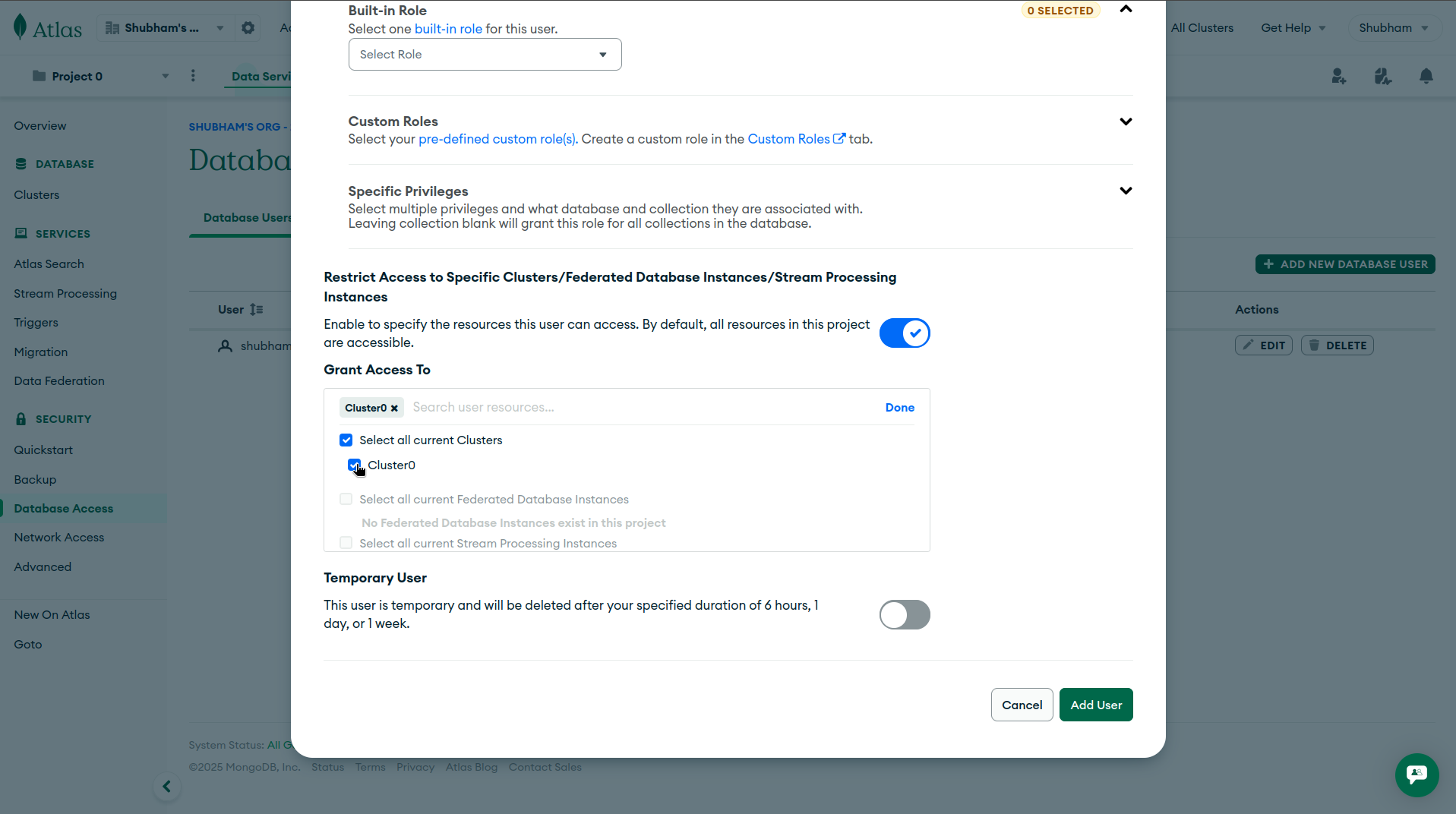
- Network connectivity from the Supermetal agent to the deployment (default port 27017). For Atlas, allow the agent in your network access rules.
Change streams requirement
Change streams require a replica set or sharded cluster. A standalone MongoDB server must be converted to a single node replica set. Amazon DocumentDB requires change streams to be explicitly enabled per database (see Setup).
Replication Modes
Supermetal offers two replication modes for MongoDB's flexible document model.
- Schema mode. Infers a typed schema from your documents, each field becoming a typed column in the target. New fields merge in as they appear. Best for analytics.
- Schemaless mode. Preserves documents as JSON in two columns (
_id,document). Supports parallel snapshots for faster initial loads. Best for variable documents or downstream JSON processing.
Consider this document.
{
  "_id": ObjectId("507f1f77bcf86cd799439011"),
  "name": "Alice",
  "email": "[email protected]",
  "age": 30,
  "is_active": true,
  "tags": ["admin", "user"]
}
Schema mode replicates a typed column per field.
_id (Utf8) | name (Utf8) | email (Utf8) | age (Int32) | is_active (Boolean) | tags (Utf8) |
|---|---|---|---|---|---|
507f1f77bcf86cd799439011 | Alice | [email protected] | 30 | true | ["admin","user"] |
Schemaless mode stores it in two columns.
_id (Utf8) | document (Json) |
|---|---|
507f1f77bcf86cd799439011 | {"name":"Alice","email":"[email protected]","age":30,"is_active":true,"tags":["admin","user"]} |
Arrays
In schema mode, arrays are serialized as JSON strings to avoid schema conflicts when element types vary across documents.
Document Flattening
Nested documents can optionally flatten into top level columns, in both replication modes, using double underscore notation. The flattening depth can be capped, leaving subtrees below the cap as JSON. Arrays do not count toward depth.
// Original MongoDB document
{
  "_id": ObjectId("..."),
  "user": {
    "name": "John",
    "address": {
      "city": "San Francisco",
      "country": "USA"
    }
  },
  "tags": ["tag1", "tag2"]
}

// Flattened representation
{
  "_id": "...",
  "user__name": "John",
  "user__address__city": "San Francisco",
  "user__address__country": "USA",
  "tags": ["tag1", "tag2"]
}
Schema Mode
Typed String Inference
Schema mode can optionally infer numeric and temporal types from string values, so a field holding "123" lands as an integer column and "2024-01-01" as a date column. A majority vote across documents picks each field's type.
Staging
Schema mode stages the entire collection during the initial snapshot to infer types. Staging defaults to local storage, and large collections can exhaust local disk, so point the staging object store at S3, GCS, or Azure Blob instead.
Setup
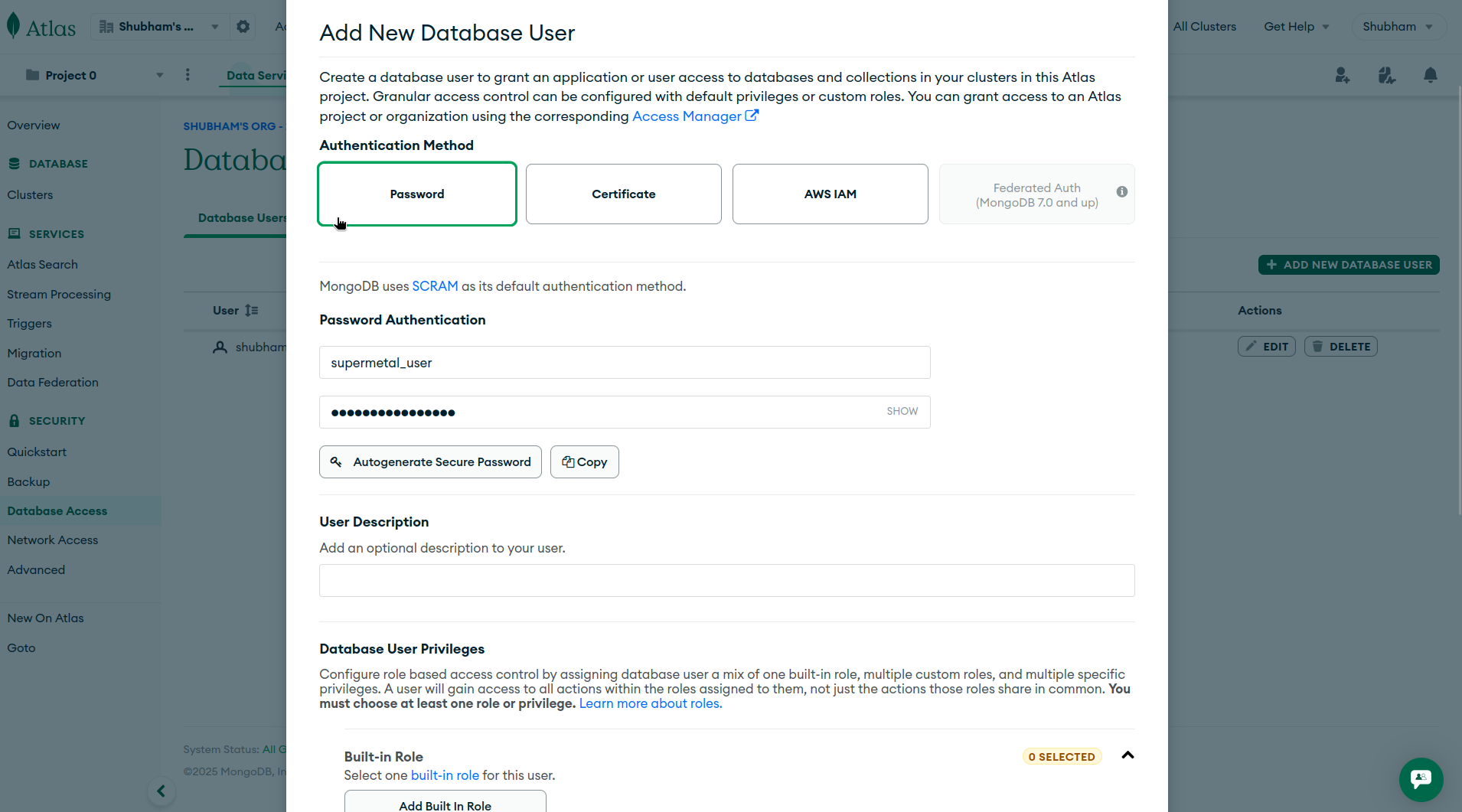
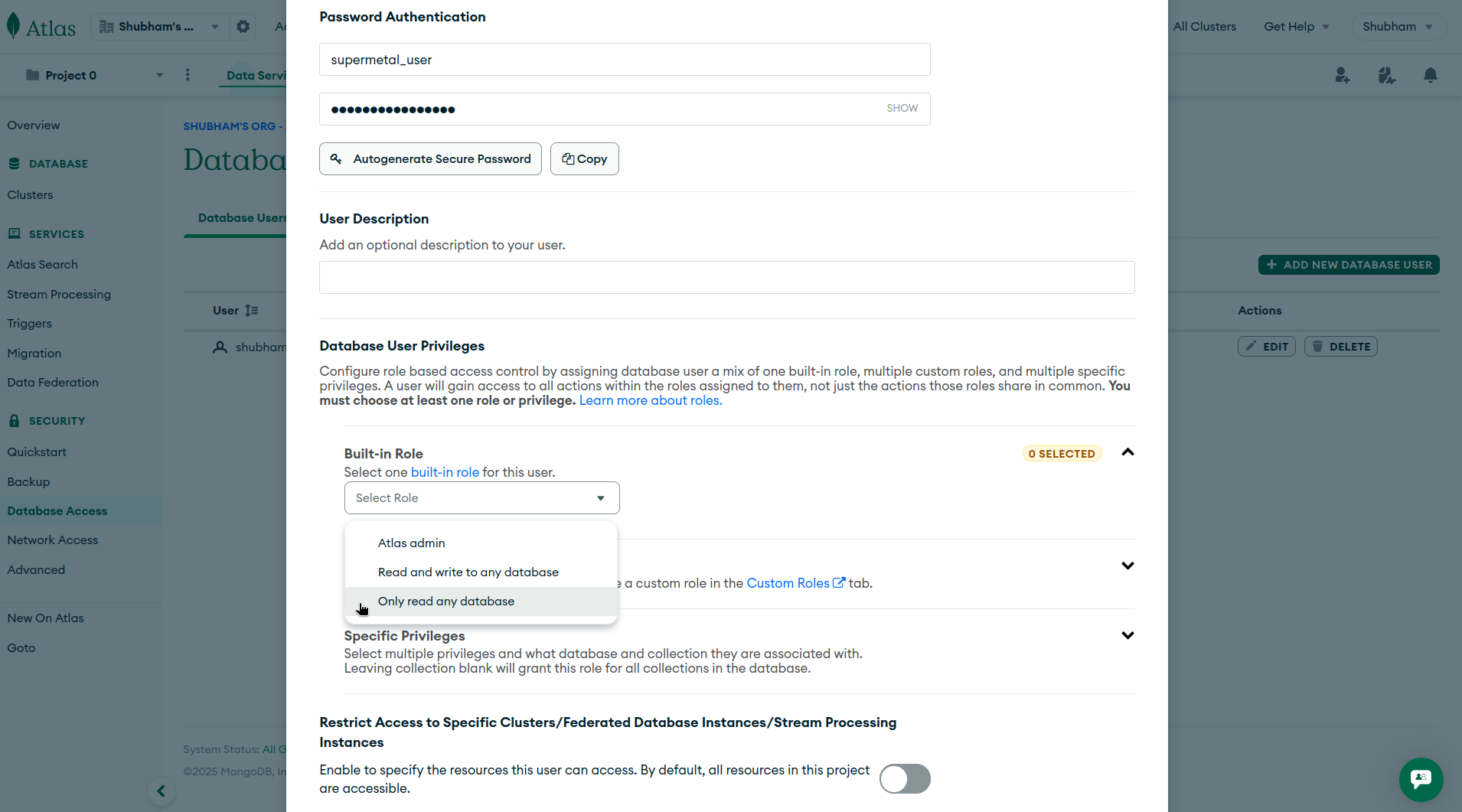
Supermetal requires a dedicated MongoDB user with permissions to read data and change streams.
| MongoDB Deployment | Minimum Required Permissions |
|---|---|
| Self managed | read role on the database to replicate from |
| MongoDB Atlas | readAnyDatabase role |
| Amazon DocumentDB | read role on the database to replicate from, plus clusterMonitor role on admin |
Create a dedicated read only MongoDB user
Connect to your MongoDB instance using the mongo shell with admin privileges:
mongosh --host <host> --port <port> -u <admin-username> -p <admin-password> --authenticationDatabase adminScript variables
Replace the placeholders with your own values:
<host>: your MongoDB server hostname or IP address<port>: MongoDB port (default 27017)<admin-username>: username with admin privileges<admin-password>: password for the admin user
Create a dedicated user for Supermetal:
use admin
db.createUser({
  user: "supermetal_user",
  pwd: "strong-password",
  roles: [
    { role: "read", db: "target-database" }
  ]
})
Script variables
Replace strong-password with a unique password and target-database with the database you want to replicate from.
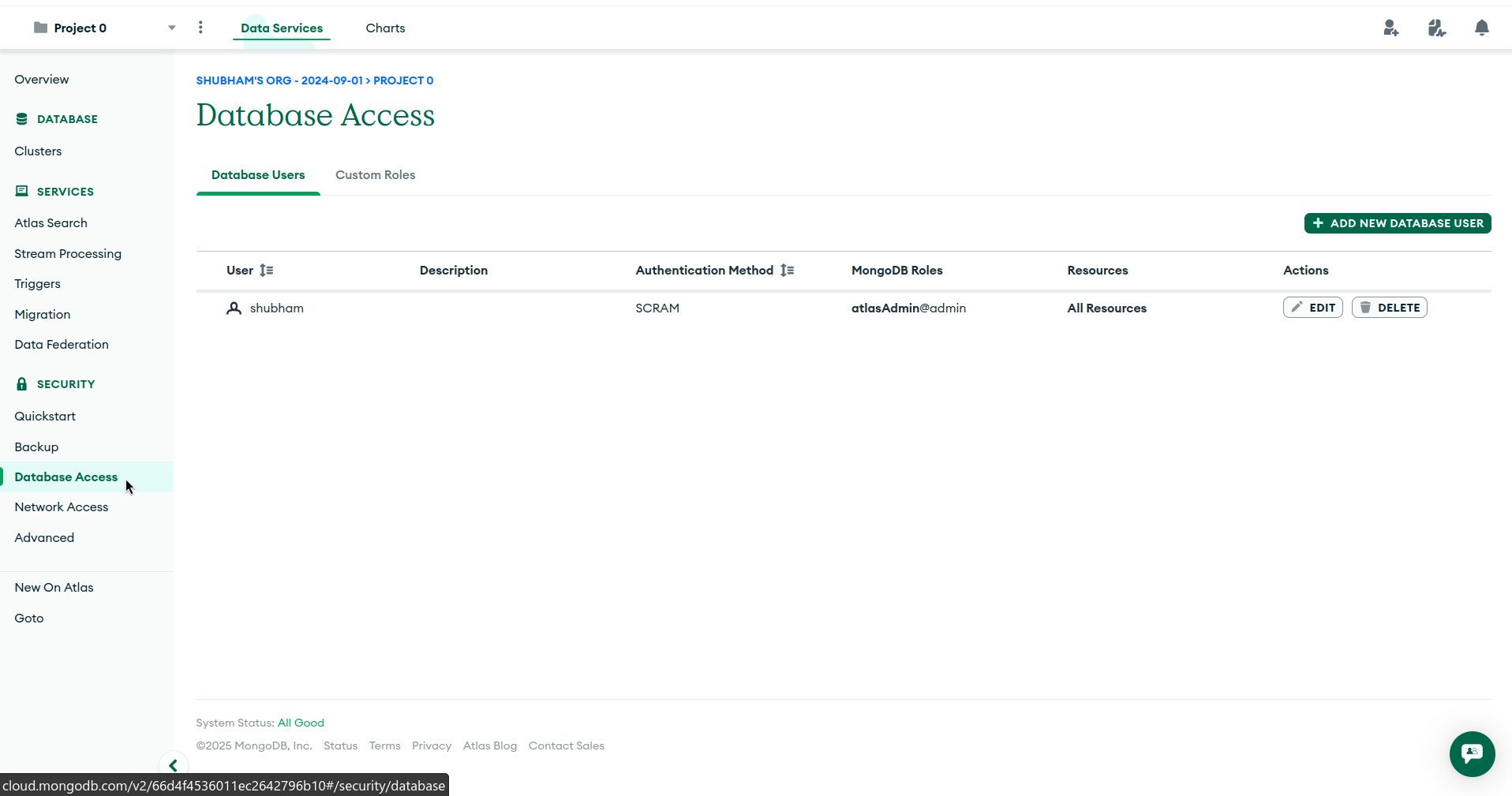
Log in to your MongoDB Atlas account
Visit cloud.mongodb.com to access your account.
Create a dedicated user for Supermetal:
use admin
db.createUser({
  user: "supermetal_user",
  pwd: "strong-password",
  roles: [
    { role: "read", db: "target-database" },
    { role: "clusterMonitor", db: "admin" }
  ]
})
Script variables
Replace strong-password with a unique password and target-database with the database you want to replicate from.
Required roles
read: read data and change streams from the target database.clusterMonitor: verify change stream configuration during connection validation.
Enable change streams on the target database:
Amazon DocumentDB requires change streams to be explicitly enabled per database. Run the following command as an admin user:
db.adminCommand({
  modifyChangeStreams: 1,
  database: "target-database",
  collection: "",
  enable: true
})
Change stream retention
Change stream events are retained for 3 hours by default (configurable up to 7 days via the change_stream_log_retention_duration cluster parameter). If the connector is paused longer than the retention window, a full re snapshot is required.
Network access
Amazon DocumentDB is VPC only and provides no public endpoints. The Supermetal agent must run within the same VPC as your DocumentDB cluster, or connect through a VPN or SSH tunnel.
IAM authentication
Amazon DocumentDB supports IAM authentication as an alternative to password auth. Add authMechanism=MONGODB-AWS to the connection string and credentials are sourced from the EC2 instance's IAM role.
Data Types Mapping
Schema mode only
The following type mappings apply to Schema mode. In Schemaless mode, documents are stored as JSON in a two column format (_id, document).
| MongoDB BSON Type(s) | Apache Arrow DataType | Notes |
|---|---|---|
Double | Float64 | NaN and Infinity convert to null. |
Int32 | Int32 | |
Int64 | Int64 | |
Decimal128 | Utf8 | Preserved as a string to maintain exact precision, since MongoDB decimals have variable precision and scale. |
| MongoDB BSON Type(s) | Apache Arrow DataType | Notes |
|---|---|---|
Boolean | Boolean |
| MongoDB BSON Type(s) | Apache Arrow DataType | Notes |
|---|---|---|
DateTime | Timestamp(ms, "UTC") | Serialized as RFC3339 in UTC. |
Timestamp | Utf8 | MongoDB internal oplog timestamp (seconds plus ordinal). Serialized as JSON: {"t": seconds, "i": increment}. |
| MongoDB BSON Type(s) | Apache Arrow DataType | Notes |
|---|---|---|
String | Utf8 | |
Symbol | Utf8 | Deprecated MongoDB type. |
RegularExpression | Utf8 | Pattern string only. |
JavaScriptCode | Utf8 | Code string only. |
JavaScriptCodeWithScope | Utf8 | Serialized as JSON with code and scope. |
| MongoDB BSON Type(s) | Apache Arrow DataType | Notes |
|---|---|---|
Binary | Utf8 | Encoded as a hexadecimal string for lossless representation. |
| MongoDB BSON Type(s) | Apache Arrow DataType | Notes |
|---|---|---|
Array | Utf8 | Stringified as JSON to avoid schema conflicts when element types vary across documents. |
Document | Utf8 (JSON) | Nested documents serialized as JSON strings. Empty documents do not contribute to schema inference. |
| MongoDB BSON Type(s) | Apache Arrow DataType | Notes |
|---|---|---|
ObjectId | Utf8 | Converted to a 24 character hex string. |
DbPointer | Utf8 | Legacy MongoDB type, serialized as JSON. |
Null | (no column) | Null values do not contribute to schema inference. |
MinKey | Utf8 | Serialized as {"$minKey":1}. |
MaxKey | Utf8 | Serialized as {"$maxKey":1}. |
Undefined | Utf8 | Deprecated type, serialized as {"$undefined":true}. |
Changelog
0.1.11
2026-07-20
Internal and system collections are now filtered from CDC and discovery.
Type inference improvements. New on_type_conflict setting controls what happens when a value does not match the inferred column type. Mixed numeric and temporal columns are widened instead of truncated. NaN and infinity values are skipped.
0.1.10
2026-07-02
Resume token is checkpointed during periods of no activity on configured tables to survive oplog rollover.
0.1.5
2026-06-08
Schema-mode timestamp parsing now handles extended IANA timezone formats like 2025-11-03T14:22:47-05:00[America/New_York].
Validation now accepts sharded clusters.
0.1.4
2026-06-02
When infer_typed_strings is enabled, a single unparseable value no longer widens the entire column to text. The majority type wins and outliers coerce to NULL.
0.1.3
2026-05-25
Fixes a type inference bug where BSON arrays were replicated as strings. Arrays now land as JSON on targets with Variant or native JSON column support.
Extends CDC retry coverage to additional transient error codes.
0.1.1
2026-05-20
Snapshot document transform now respects row boundaries to avoid arrow Utf8 i32 offset overflow on collections with large string fields.
Last updated on